Growgoyle is cultivation management software for running your entire grow in one place. Plan crops and the week, assign the work, keep maintenance on the calendar, and connect room records with harvest results. AI helps you investigate the record; the operation comes first.
It was built by a 15-year software engineer who also runs a commercial cultivation facility in Michigan. Not by a software company that interviewed some growers. By someone who needed it for his own operation first.
If you searched “Growgoyle” because someone mentioned it, or you saw it in a Facebook group, or you got a cold email from Eric, here’s what it actually is and why it exists.
The Problem Growgoyle Solves
The problem is familiar: too much of the operation lives in your head. The crop plan, who was supposed to do what, the meter that needs calibrating, and the details from the last good run.
Your operation probably runs on a whiteboard, a spreadsheet that’s two harvests behind, and whatever the head grower remembers. Every day that data doesn’t get captured, it’s gone. You can’t reconstruct what week 4 looked like from memory when you’re three runs past it.
You remember the run where everything clicked. Great dry weight, clean canopy, smooth dry, solid test results. But when you try to do it again, something’s different. Maybe yields drop 10%. Maybe a strain that used to crush is suddenly underperforming. You can’t pinpoint why because the data from that great run doesn’t live anywhere useful.
A state record tells you that you harvested 47 pounds. The cultivation record should also show what happened in the room and what your team did, so you have something useful to review when the result changes. Some commercial platforms cover both jobs; check the workflow rather than assuming the label tells you everything.
METRC is for the state to track your grow. Growgoyle is for you to track your grow and repeat what works, run after run.
What Growgoyle Does
Start with the everyday work. Crop and weekly planning put rooms, cultivars, timing, and assignments together. Daily Focus shows the work, owners, completion history, and attention needed. Recurring maintenance, SOPs, consumables, and purchasing keep the less glamorous jobs from falling through the cracks. Notes, photos, feed and runoff records, sensor readings, harvests, and lab results stay with the crop.
Plan the Work and Keep the Record
You can start with a room already in flower. Set up the crop and schedule the work, then add records as you go. Growgoyle offers direct connections for supported Pulse, TrolMaster, and AROYA devices and accounts, plus CSV imports for supported formats. Check the device and provider access before assuming a feed will connect. Your controller keeps controlling the equipment.
Photo Analysis
Snap a photo of your canopy with your phone and use the analysis as a second opinion on visible symptoms, plant condition, and canopy uniformity. Findings can suggest a nutrient issue, light stress, or pest damage worth checking. A photo cannot confirm every deficiency, identify every pathogen, or replace an inspection and the appropriate tests.
You can do this any time during a run. Walk through your room, snap a photo, get a second opinion. No special equipment. No setup. Just your phone camera.
The useful difference is the crop context you have actually recorded. Growgoyle can consider the cultivar, phase, environment, work history, and earlier observations that are available for that batch. Missing records stay missing; the system does not know a feeding change or spray happened unless it was captured.
Want to see it work before signing up? Upload a photo for free. No account required. Or see a real AI observation from an actual facility.
AI Batch Analysis
After a run, bring the available environment records, harvest weights, quality results, photos, and operational notes into a review. The Goyle Score summarizes supported dimensions, while the analysis explains strengths, concerns, and opportunities to investigate. The score uses both facility history and defined scoring rules; it is not entirely a comparison with your personal best.
The useful output is a question or change you can take back to the room, with the supporting records close by. Any modeled yield opportunity is an estimate for investigation, not a forecast or proof of pounds lost.
A fuller history gives you more to compare. Keep recording the work and outcomes that matter, and inspect the evidence behind each recommendation. A missing record or a poor comparison can limit the conclusion even after many runs.
You can start the record with a room already in flower. Scheduling, coordination, and maintenance are useful immediately; analysis uses the records available for that batch and shows where the evidence is thin.
See a real AI batch analysis with actual data.
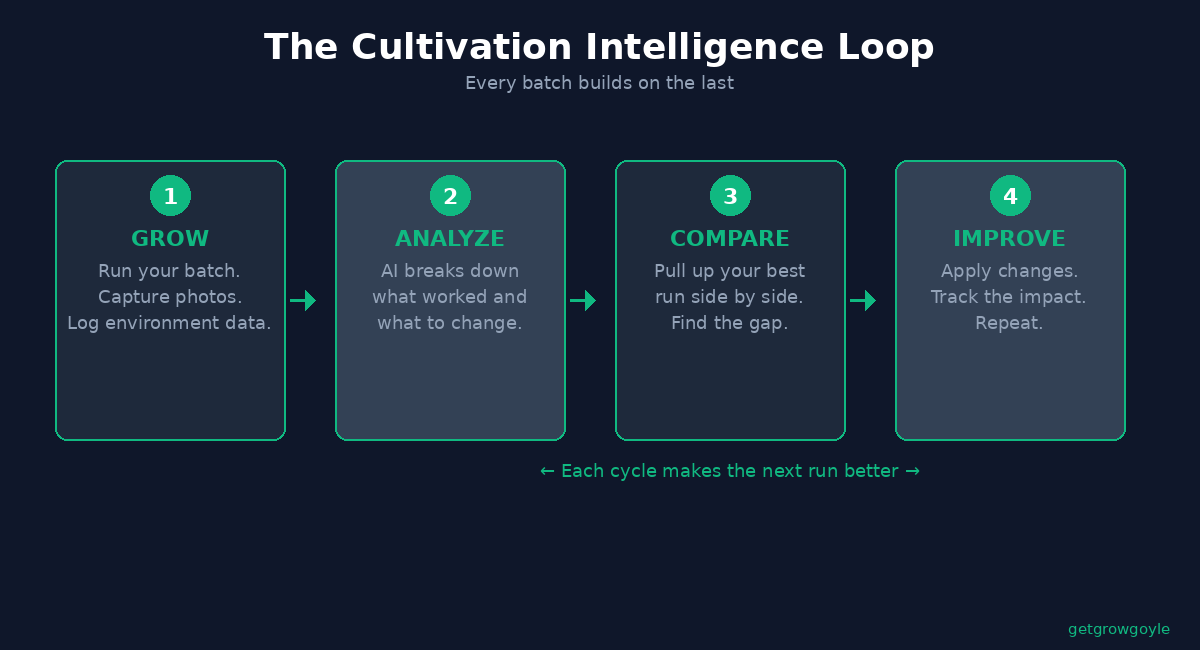
AI Batch Comparison
Pull up two runs at the same stage and review the differences in conditions, work, photos, and outcomes. Analysis can identify plausible contributors and conflicting evidence. Correlation helps narrow an investigation; it does not establish which change caused the yield difference.
This is how you answer the question every grower asks: “What made that great run great?”
When a strain drops from 3.2 lb/light to 2.8, put the runs beside each other and look for differences worth checking. You may find a documented miss, several overlapping changes, or a gap in the record that the next run needs to close.
The Daily Operating View
The analysis sits on top of the everyday record. Day to day, the platform helps with:
- Daily Focus: Review scheduled work, owners, completed and missed tasks, recurring maintenance, and attention needed alongside crop context.
- Smart Scheduling: Visual phase timelines across your facility. See every room’s status, upcoming transitions, and planned activities at a glance.
- Task Management: Priority-ranked daily task lists with zone tags and team assignments. One-click task creation from Daily Focus recommendations.
- Environmental Monitoring: Bring in data from your existing sensors. Phase-aware alerting helps you spot conditions drifting out of range, including in dry rooms.
Who Growgoyle is For
Commercial indoor cultivators running real operations. Specifically:
- Multi-facility operators who need site-specific access, a clear record at each facility, and one login for moving between them.
- Single-facility commercial grows, from an owner doing the work personally to a crew coordinating rooms and cultivars.
- Operations where the head grower carries everything in their head and the business is one bad hire or one retirement away from losing institutional knowledge.
The product is built around commercial production: crop schedules, a shared work record, maintenance, and repeatable operations. You do not need a minimum crew size or a stack of completed harvests to start using those parts.
How Growgoyle is Different
Several cultivation platforms now offer AI, tasks, sensors, and run comparisons. Growgoyle’s case is the whole operating workflow: build a plan, get the work done, keep the record, and use it when making the next decision. Test that sequence with the room you are running now.
How it fits with the systems you already run:
- Keep the state reporting workflow. Growgoyle is not a full seed-to-sale or state-compliance replacement. Keep your required reporting system in place and confirm the availability and scope of any Growgoyle METRC workflow for your account and state.
- Keep working hardware where it fits. Supported Pulse, TrolMaster, and AROYA connections and CSV imports bring readings into the crop record. Confirm the device and account support first.
- Not equipment automation. Growgoyle never touches your equipment. It advises. It never controls. Your irrigation system, your lights, your HVAC remain entirely in your hands.
- Operational costs, not general accounting. Growgoyle can track task labor and attribute configured facility overhead to a run. Those figures help compare operations; attributed overhead is not invoice-level COGS or an audited cost per pound. Keep payroll, invoicing, and accounting in the systems built for them.
A useful test is a normal week in your facility: plan the work, record what happened, and find it again when you need it. The live demo shows the workflow before you commit your own data.
Who Built It
Growgoyle was built by Eric Klamer, a 15-year software engineer who operates a commercial cultivation facility in Michigan.
The origin story is simple: Eric needed a better way to plan crops, schedule the work, and keep track of what happened in his own facility. Comparing harvests mattered too. “My last Afghan Kush run hit 3.2 lb/light. This one hit 2.7. What changed?” is easier to investigate when the work and room history already live together.
So he built the tool he needed. Growgoyle started as internal software running Eric’s own facility. The AI analysis, the batch comparison, the daily guidance system all evolved from real problems in a real grow operation. Not from a product team brainstorming what growers might want.
Built by a grower. Not built “for” growers by people who interviewed some.
Growgoyle is patent pending.
Pricing
Transparent. No “request a demo” gatekeeping.
- $499/month per active facility. One complete product with unlimited rooms, zones, plant batches, cultivars, and users.
- $5,389/year per active facility. Save 10% compared with monthly billing.
- 30-day complete-product trial. No credit card required.
An active facility is one independently operated physical cultivation site. Rooms, buildings, licenses, zones, benches, cultivars, plant batches, users, and historical runs at one integrated site do not create extra billing units. Compute-intensive AI uses a pooled per-facility reasonable-use allowance.
Try It Before You Sign Up
The fastest way to understand the workflow is to look around, then try it with your own operation:
- Explore the live demo. View the facility, daily work, and crop records without signing up. The demo is view-only.
- Start a 30-day free trial with complete product access and no credit card, then put it through a real run.
Or explore the free tools first:
Questions? info@growgoyle.ai or text 616-221-9856.
Frequently Asked Questions
Does Growgoyle replace my seed-to-sale software?
Growgoyle is not a full seed-to-sale or state-compliance replacement. Keep your required reporting system in place and confirm the availability and scope of any Growgoyle METRC workflow for your account and state. Growgoyle connects cultivation planning, work, maintenance, records, and analysis around that required reporting.
Do I need special sensors or hardware?
You do not need a hardware purchase to start planning crops and recording work. Growgoyle offers direct connections for supported Pulse, TrolMaster, and AROYA devices and accounts, plus CSV imports for supported formats. Check the device and provider access before assuming a feed will connect. Your controller keeps controlling the equipment.
What does the AI actually analyze in photos?
The analysis looks for visible characteristics such as canopy uniformity and symptoms consistent with stress, deficiencies, pests, or disease. Treat those as inspection leads, not confirmed diagnoses. The quality of the photo and the recorded crop context affect what can be assessed.
How is this different from AROYA?
AROYA is a cultivation platform with substrate and environmental sensing, irrigation tools, tasks, notes, and newer AI and automation features. Growgoyle emphasizes planning, daily work, maintenance, and connected crop records while leaving equipment control to your existing system. Supported AROYA data can also connect to Growgoyle. Compare the workflow and total setup instead of assuming the choice is software versus sensors.
Is my data private?
Your account’s operational records are kept separate from other accounts, with access controlled by user roles and facilities. That privacy boundary is different from scoring: the Goyle Score combines your available history with defined scoring rules and ranges. See the privacy policy for data handling details.
Can I use Growgoyle on my phone?
Yes. The platform works on phone, tablet, PC, and shop floor TV monitors. Photo uploads happen directly from your phone camera.
What about facilities in multiple states?
Yes. Grant site-specific access, switch facilities from one login, and keep each facility’s operational record separate. Each independently operated active site is billed at the same facility rate. For help with a portfolio rollout, reach out.
About the Author
Eric Klamer is a 15-year software engineer who operates a commercial cannabis cultivation facility in Michigan. He built Growgoyle to run his own operation and now offers it to commercial growers nationwide. Contact: info@growgoyle.ai | 616-221-9856